NestJS 예외 처리 (Error Exception)

API에서 오류가 났을 때 클라이언트는 일관된 응답을 받아야 하고, 개발자는 원인을 찾을 수 있어야 합니다. 그렇다고 내부 오류 메시지와 스택을 그대로 사용자에게 보내면 안 되겠죠.
NestJS의 Exception Filter는 요청 처리 중 발생한 예외를 HTTP 응답으로 바꾸는 경계입니다. 기본 동작을 이해한 뒤 응답 형식, 공개할 메시지, 서버 로그를 나누어 설계해보겠습니다.
2023년 글을 보완했습니다. 아래 코드는 NestJS의 Express 어댑터에서 JSON API를 처리하는 예제입니다. Fastify, GraphQL, 메시지 큐 작업에 그대로 적용하는 범용 필터는 아닙니다.
기본 예외 처리로 어디까지 되는가?
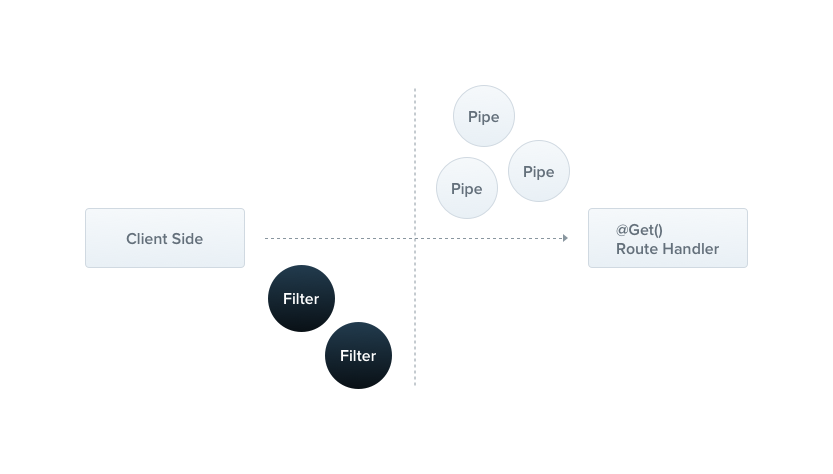
NestJS는 요청 처리 중 잡히지 않은 예외를 처리하는 레이어를 제공합니다. HttpException은 지정한 상태 코드와 응답을 사용하고, 알 수 없는 오류는 보통 다음과 같이 처리합니다. NestJS 공식 예외 필터 문서의 기본 동작입니다.
1
2
3
4
{
  "statusCode": 500,
  "message": "Internal server error"
}
예상 가능한 실패라면 NotFoundException, BadRequestException 같은 내장 HTTP 예외로 의도를 표현할 수 있습니다. 정상 응답의 HTTP 상태를 200으로 둔 채 본문에만 오류를 넣으면, 상태 코드를 보는 클라이언트나 모니터링에서 실패를 구분하기 어려워집니다.
다만 모든 서비스 계층에 HTTP 예외를 넣어야 하는 것은 아닙니다. 동일한 업무 로직을 HTTP와 배치에서 함께 쓴다면 도메인 오류를 정의하고 HTTP 경계에서 상태 코드로 변환하는 방식도 가능합니다. 오류를 어디에서 HTTP로 해석할지 일관된 기준을 두면 됩니다.
먼저 응답 계약을 정한다
커스텀 필터를 만들기 전에 무엇을 반환할지부터 정해보겠습니다.
| 필드 | 예제의 규칙 |
|---|---|
statusCode | HTTP 상태와 같은 값 |
message | 공개 가능한 4xx 설명 또는 검증 메시지 배열; 5xx는 일반 메시지 |
timestamp | 응답 생성 시각의 ISO 문자열 |
프론트엔드가 문구를 비교해 분기해야 한다면 별도의 안정적인 업무 오류 코드도 설계할 수 있습니다. 예를 들어 DOCUMENT_ALREADY_COMPLETED 같은 코드와 사용자에게 보여줄 문구를 분리하는 방식입니다. 아래 최소 예제는 그런 업무별 코드 체계까지 만들지는 않습니다.
HttpException.getResponse()는 문자열일 수도, 객체일 수도 있습니다. 객체의 message도 검증 오류처럼 배열일 수 있어요. exception.message 하나만 반환하면 원래 전달하려던 정보를 잃을 수 있습니다. HttpException 구현에서도 응답 본문과 오류 객체의 메시지는 별도로 다룹니다.
공개 응답과 내부 로그를 분리하는 필터
다음은 HttpException이면 상태를 유지하고, 나머지는 500으로 바꾸는 예제입니다. 4xx 메시지는 애플리케이션이 공개 가능한 내용으로 생성한다는 전제입니다.
1
2
3
4
5
6
7
8
9
10
11
12
13
14
15
16
17
18
19
20
21
22
23
24
25
26
27
28
29
30
31
32
33
34
35
36
37
38
39
40
41
42
43
44
45
46
47
48
49
50
51
52
53
54
55
56
57
58
// api-exception.filter.ts
import {
  ArgumentsHost,
  Catch,
  ExceptionFilter,
  HttpException,
  Logger,
} from '@nestjs/common';
import type { Response } from 'express';

type PublicMessage = string | string[];

function readMessage(exception: HttpException): PublicMessage {
  const body = exception.getResponse();
  if (typeof body === 'string') return body;

  if (body !== null && typeof body === 'object' && 'message' in body) {
    const message: unknown = body.message;
    if (typeof message === 'string') return message;
    if (Array.isArray(message) && message.every(item => typeof item === 'string')) {
      return message;
    }
  }
  return exception.message;
}

@Catch()
export class ApiExceptionFilter implements ExceptionFilter {
  private readonly logger = new Logger(ApiExceptionFilter.name);

  catch(exception: unknown, host: ArgumentsHost): void {
    const response = host.switchToHttp().getResponse<Response>();
    const status = exception instanceof HttpException ? exception.getStatus() : 500;

    if (status >= 500) {
      this.logger.error(
        'HTTP request failed',
        exception instanceof Error ? exception.stack : undefined,
      );
    }

    // 이미 응답을 시작했다면 두 번째 JSON 응답을 쓰지 않습니다.
    if (response.headersSent) {
      if (!response.writableEnded) response.end();
      return;
    }

    const message = exception instanceof HttpException && status < 500
      ? readMessage(exception)
      : 'Internal server error';

    response.status(status).json({
      statusCode: status,
      message,
      timestamp: new Date().toISOString(),
    });
  }
}
@Catch(HttpException)은 해당 타입과 하위 클래스만 대상으로 삼습니다. 여기서는 일반 Error까지 응답 형식을 맞추기 위해 @Catch()를 사용했습니다. HTTP 라이브러리의 독자적인 오류 객체를 모두 인식하는 필터는 아니므로, 추가 라이브러리의 오류를 지원하려면 명시적으로 매핑해야 합니다.
예제는 5xx의 상세 메시지를 서버 로그에만 남깁니다. 로그에도 연결 문자열이나 개인정보가 들어갈 수 있으므로 실제 로깅 설정에서 수집 범위·마스킹·접근 권한을 정해야 합니다. 오류마다 같은 내용을 인터셉터와 필터에서 중복 기록하지 않도록 책임도 정하고요.
응답을 이미 전송한 뒤 발생한 오류는 새 JSON으로 교체할 수 없습니다. 위 분기는 중복 전송을 피하기 위한 것이며, 다운로드·SSE 등의 중간 실패를 표현하는 프로토콜은 해당 스트리밍 경로에서 별도로 설계해야 합니다.
필요한 범위에 등록한다
| 적용 범위 | 등록 위치 | 용도 |
|---|---|---|
| 특정 핸들러 | 메서드의 @UseFilters(ApiExceptionFilter) | 일부 API의 별도 계약 |
| 컨트롤러 | 클래스의 @UseFilters(ApiExceptionFilter) | 관련 API 묶음 |
| 전체 HTTP API | 모듈의 APP_FILTER provider | 공통 응답 계약 |
전체 응답을 통일하려면 다음 provider를 기존 모듈에 추가합니다. 기존 imports·controllers·providers는 유지합니다.
1
2
3
4
5
6
7
8
9
10
import { Module } from '@nestjs/common';
import { APP_FILTER } from '@nestjs/core';
import { ApiExceptionFilter } from './api-exception.filter';

@Module({
  providers: [
    { provide: APP_FILTER, useClass: ApiExceptionFilter },
  ],
})
export class AppModule {}
모듈을 통해 생성하면 나중에 로거 같은 의존성을 주입하기에도 적합합니다. 여러 범위에 필터를 붙였다고 하나의 예외가 모든 필터를 차례대로 통과하는 것은 아닙니다. 요청 핸들러에 가까운 필터가 처리하면 같은 예외를 상위 필터에서 다시 처리하지 않습니다. NestJS 요청 생명주기 문서의 필터 순서를 확인해야 합니다.
필터가 처리하지 못하는 경계도 있다
컨트롤러가 반환하거나 기다리는 비동기 작업의 실패는 요청 흐름에 연결할 수 있습니다. 반면 응답 후 실행되는 타이머나 기다리지 않은 백그라운드 Promise의 실패는 이 HTTP 응답으로 해결할 수 없습니다.
그래서 요청마다 try/catch를 무조건 추가하기보다, 실패를 복구할 수 있는 계층에서 처리하고 그렇지 않으면 요청 경계까지 전달하는 편이 낫습니다. 큐 작업은 작업의 재시도·실패 저장을, 스케줄 작업은 다음 실행과 중복 처리를 별도로 정해야 합니다.
적용 후 확인할 사례
아래는 예제의 기대 동작입니다. 프로젝트에 적용할 때 HTTP 요청으로 검증할 수 있습니다.
| 입력 상황 | 확인할 결과 |
|---|---|
NotFoundException('대상을 찾을 수 없습니다.') | HTTP 404와 동일한 statusCode, 공개 메시지 유지 |
BadRequestException({ message: ['name은 필수입니다.'] }) | HTTP 400, 메시지 배열 유지 |
예상하지 못한 Error | HTTP 500, 내부 메시지·스택이 응답에 없음 |
InternalServerErrorException('DB 세부 오류') | HTTP 500, 상세 내용 대신 일반 메시지 |
| 로컬 필터가 붙은 API | 공통 응답 계약을 의도적으로 바꿨는지 확인 |
예외 필터의 가치는 에러 JSON에 필드 몇 개를 추가하는 데서 끝나지 않습니다. 클라이언트에게 약속한 실패 형식을 유지하고, 내부 원인을 추적할 수 있게 하며, 처리할 수 없는 경계를 분명히 하는 것이 핵심입니다.